LOTSE HELPER
An optional companion for LOTSE on macOS.
LOTSE ships through the Mac App Store, which means it runs in a sandbox. That sandbox is a good thing — it is also why a handful of features cannot work from inside the app. Setting your Wi-Fi interface's MTU, for one, requires root. So does reading the system's own list of remembered Wi-Fi networks.
The Helper is a small background service that does this kind of job for LOTSE — you will find everything LOTSE asks of it in the list below. LOTSE works without it. Install it if you want the features below; skip it and everything else behaves normally.
Download
- Version
- 2.10.0
- Size
- 1.3 MB
- Requires
- macOS 14 or newer
- Signed by
- Developer ID Installer: Stefan Gentz (FXNM9Q94Z4)
- Notarized
- Yes, by Apple
- SHA-256
44b56f3dcaeac645ed4eae143c457a1c56da7d2394a514b044e714ca8afa32ec
Permanent link to this exact version — the button above always points at the newest release, this one never changes.
Check what you downloaded
You are about to install something that runs as root. You should not have to take my word for what it is, so here are the two commands that let you check it yourself:
shasum -a 256 ~/Downloads/LOTSE-Helper.pkg
pkgutil --check-signature ~/Downloads/LOTSE-Helper.pkg
The first must print the digest listed above. The second must name Stefan Gentz (FXNM9Q94Z4) and report that the package is trusted by Apple's notary service. If either disagrees, do not install it — and please tell me.
What it does
This is everything LOTSE asks the Helper to do:
- Sets the MTU of your connection. LOTSE measures the largest packet a network carries and writes that value to the network interface you are using, which fixes the “connected, but some sites never load” kind of problem. It is the same MTU setting you would find in System Settings → Network under a connection's Details → Hardware, so it stays in place until LOTSE or you change it. On an IKEv2 or IPsec VPN, the Helper also applies the value to the running tunnel. Measuring happens inside the app; only the writing needs root.
- Reads your remembered Wi-Fi networks. macOS keeps that list in a file locked to root. Reading it lets LOTSE fill in networks you joined long before you installed it.
- Turns Wi-Fi off and on right inside LOTSE, in its Current Network settings.
- Applies the IP settings you saved for a Wi-Fi network. If you give a network fixed IP settings in LOTSE — a manual address, for example — the Helper writes them to your Wi-Fi when you join that network. On any other network LOTSE knows, it sets your Wi-Fi back to automatic settings. It writes only when something actually has to change.
- Switches your main connection. When you make another connection your main one in LOTSE, or when failover moves you to your backup because your main connection stopped working, the Helper changes the order of the network services in your Mac's network settings. After a failover, LOTSE restores your original order once your main connection works again.
- Keeps your backup connection ready. For an iPhone connected over USB, macOS has “Disable unless needed” switched on by default, which keeps that connection down while another one is available. When you pick a connection as your backup, the Helper switches that setting off, so failover can use it the moment it is needed — and sets it back the way it was when you remove the backup.
- Brings a dropped USB tether back. An Android phone shares its connection over USB through a separate driver app, and that connection goes away whenever macOS rebuilds its network configuration — including when LOTSE itself switches you to another network. The Helper sets it up again in about three seconds, so the phone is still there when you need it as a backup.
- Explains a failed VPN connection test. When a connection test for an IKEv2 VPN profile fails, the Helper reads what macOS logged about that negotiation, limited to the minutes the test ran, so LOTSE can tell you the exact reason instead of a plain “failed”.
- Lets a VPN profile sign in with its certificate. When an IKEv2 or Cisco IPSec profile uses a certificate, the Helper places that certificate and its key in your Mac's system keychain and puts the three macOS programs that sign these connections on the key's access list. The profile then connects without a password prompt. If the key is already there without those programs on its list, the Helper stores it again with them. The key is stored so that it cannot be exported. When you delete the profile, the Helper takes the key and its certificate out of the keychain again — unless another LOTSE profile still uses it.
- Takes you completely offline — and back. Hard Kill blocks all network traffic, in and out, on every interface, the VPN tunnel included, as if you had pulled the cable. The Helper does this with the packet filter built into macOS, in a rule set of LOTSE's own that leaves your other firewall rules alone, and reads the state back so LOTSE can show you whether the blackout is in force. A Hard Kill you leave on stays on after a restart. It is made for going dark on purpose, not as protection against someone who has your Mac in front of them — the ways back online are below.
- Reads the powerline behind a repeater. When your Wi-Fi comes from a repeater that reaches the router over powerline, LOTSE can only see the repeater. The Helper asks the powerline adapters themselves — which one sits at the router, how fast the line is right now, what each adapter is (product name, chip and firmware) and how fast its Ethernet port negotiated with the router — so LOTSE draws the whole path instead of a gap. Sending those frames needs root; nothing leaves your home network.
- Times how fast your router answers when LOTSE cannot get a clean reading from inside the app: a handful of pings to your router, nothing beyond it.
Beyond that, LOTSE only asks the Helper for its version, to restart when you have installed a newer one, and to remove itself when you uninstall it.
It has no user interface, never contacts anything on the internet, and stores nothing about you. It starts with your Mac, so that a Hard Kill you left on is back in force right away, and otherwise waits for LOTSE to ask. It takes requests from LOTSE alone: every connection has to carry LOTSE's code signature, or it is refused.
Getting back online without LOTSE
You switch Hard Kill off in LOTSE, in the same place you switched it on. Should LOTSE ever be unable to lift it, the package includes a rescue script that undoes the blackout by itself, without LOTSE and without the Helper. Run it in Terminal:
sudo /Library/PrivilegedHelperTools/cloud.lotse.app/hardkill-deactivate.shIf the script cannot lift it, restart your Mac in Safe Mode and run the script again there. Safe Mode on its own may get you online, but only until your next normal restart: a Hard Kill is made to survive a restart, and the script is what switches it off for good.
Install
Open the package and follow the installer. macOS will ask for your administrator password — installing a system service is exactly the moment it should.
LOTSE notices the Helper within a minute and unlocks the features by itself. Nothing to restart.
One extra step for the Wi-Fi history
To read the remembered-networks list, the Helper needs Full Disk Access — the same permission Time Machine and backup tools ask for. Grant it in System Settings → Privacy & Security → Full Disk Access, where it appears as LOTSE Helper. The other features work without it.
Remove it
The Helper is a separate install, so removing LOTSE does not remove it. You do not need a terminal for that, though — LOTSE takes it off for you.
Open LOTSE → Settings → General and scroll to LOTSE Helper. While the Helper is installed, the card lists what it unlocks, whether Full Disk Access has been granted, and which version is running.
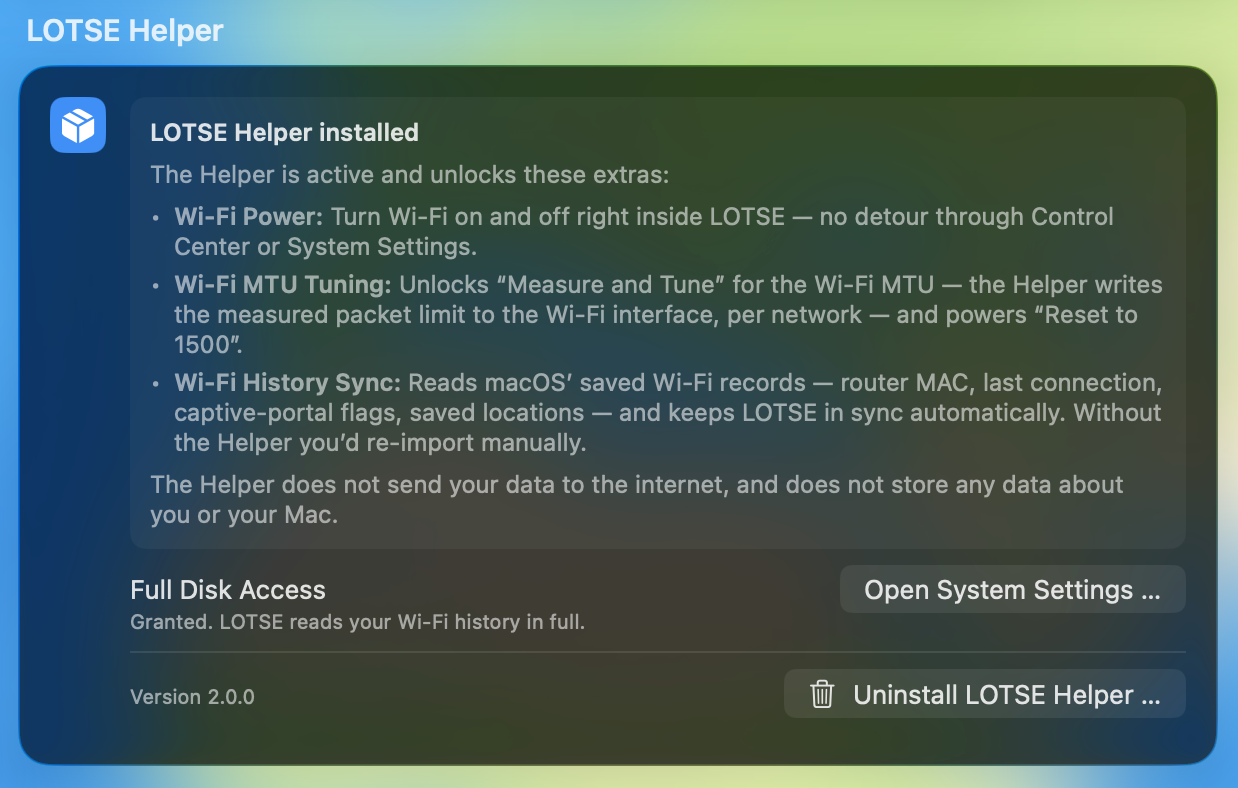
Click Uninstall LOTSE Helper … and confirm once. No administrator password is needed: the Helper is already running with the privileges required, so it removes its own files, unregisters its background service and drops its installer receipt. It removes exactly what the installer put there, in reverse — the end state is the same one you would get by doing it by hand.
LOTSE then behaves as if the Helper had never been there, and says so within a minute. One leftover is not ours to clean: macOS keeps the Helper's entry in System Settings → Privacy & Security → Full Disk Access until you remove it there with the − button. That list outlives every uninstall on macOS, not just this one.